> ## Documentation Index
> Fetch the complete documentation index at: https://docs.listenlabs.ai/llms.txt
> Use this file to discover all available pages before exploring further.
# Multilingual Voice Interviewer
> Run AI-moderated voice interviews in 40+ languages with natural-sounding audio
Listen's voice interviewer reads questions aloud to participants in 40+ languages with natural-sounding audio.
For text-based translation across 90+ languages, see [**Localizing Your Study: Auto-Translations**](setup-to-launch/auto-translations)
***
## What the Multi-lingual Voice Interviewer Does
When the voice interviewer is enabled, participants hear questions read aloud. This makes interviews more accessible and conversational — particularly valuable for:
* Markets where reading in a second language creates fatigue
* Older audiences or those with lower literacy rates
* Mobile studies where audio-first feels more natural than reading
* Studies designed to feel like a natural conversation rather than a survey
***
## Choosing a Language and Voice
Listen offers multiple voice options for each of the 42 supported languages. Voices vary in tone, pacing, and regional accent — so you can choose one that feels authentic for your target audience.
*(Note: Voice audio is separate from Auto-Translations, which covers \~100 languages for text-based interviews.)*
### How to Configure Voice Settings
1. Open your study in the **Editor**.
2. Click the **settings icon** (wrench) in the left sidebar.
3. Navigate to **Language & Voice** settings.
4. Select your target language.
5. Preview available voice options and choose the best fit for your study.
6. Save your settings.
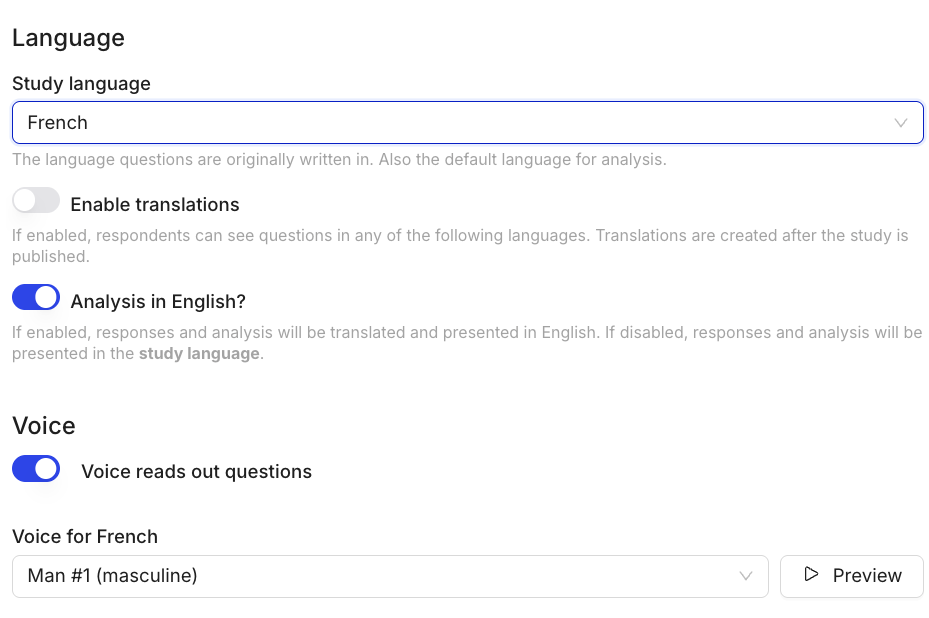 Preview voices before launching. Some are more formal or informal — choose a voice that matches the register of your questions and your target audience.
***
## Supported Languages
Listen currently supports **40+ languages with voice**, including:
* **Europe:** English, French, German, Spanish, Italian, Portuguese, Dutch, Swedish, Norwegian, Danish, Finnish, Polish, and more
* **Americas:** US English, Brazilian Portuguese, Latin American Spanish, Canadian French
* **Asia-Pacific:** Japanese, Mandarin, Korean, Hindi, Indonesian, Vietnamese, and more
* **Middle East & Africa:** Arabic, Hebrew, Turkish, Swahili
The full list is in the Language Settings panel. New languages are added regularly — email [**support@listenlabs.ai**](mailto:support@listenlabs.ai) if you need a language not currently listed.
***
## Voice vs. Text Interviewer
You can use voice and text interchangeably per study, or set a study-wide default. Text tends to work better for B2B and professional audiences; voice performs better for consumer research, mobile-first studies, and international markets where reading in a second language is a barrier.
***
**Anything missing?** Let us know at [support@listenlabs.ai](mailto:support@listenlabs.ai) and we'll help you out!
Preview voices before launching. Some are more formal or informal — choose a voice that matches the register of your questions and your target audience.
***
## Supported Languages
Listen currently supports **40+ languages with voice**, including:
* **Europe:** English, French, German, Spanish, Italian, Portuguese, Dutch, Swedish, Norwegian, Danish, Finnish, Polish, and more
* **Americas:** US English, Brazilian Portuguese, Latin American Spanish, Canadian French
* **Asia-Pacific:** Japanese, Mandarin, Korean, Hindi, Indonesian, Vietnamese, and more
* **Middle East & Africa:** Arabic, Hebrew, Turkish, Swahili
The full list is in the Language Settings panel. New languages are added regularly — email [**support@listenlabs.ai**](mailto:support@listenlabs.ai) if you need a language not currently listed.
***
## Voice vs. Text Interviewer
You can use voice and text interchangeably per study, or set a study-wide default. Text tends to work better for B2B and professional audiences; voice performs better for consumer research, mobile-first studies, and international markets where reading in a second language is a barrier.
***
**Anything missing?** Let us know at [support@listenlabs.ai](mailto:support@listenlabs.ai) and we'll help you out!